Based on overwhelming feedback over the years we're happy to announce the addition of a new custom button generator and product widgets to DPD. In addition, we've revamped the button creation process to better organize the new features and options.
Creating Buttons and Widgets
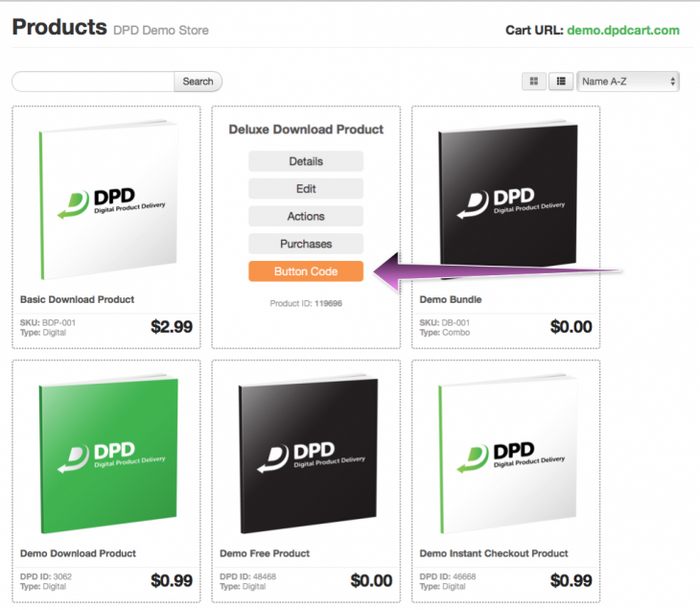
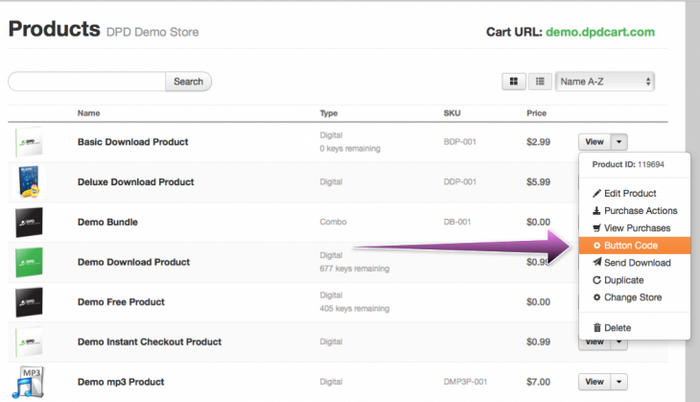
Buttons, widgets, link codes, QR codes, and product choosers are now created from the product list by selecting the Link Code option for a given product.
Grid View: Move your mouse over any product and select link code.
List View: Select Link Code from the product menu.
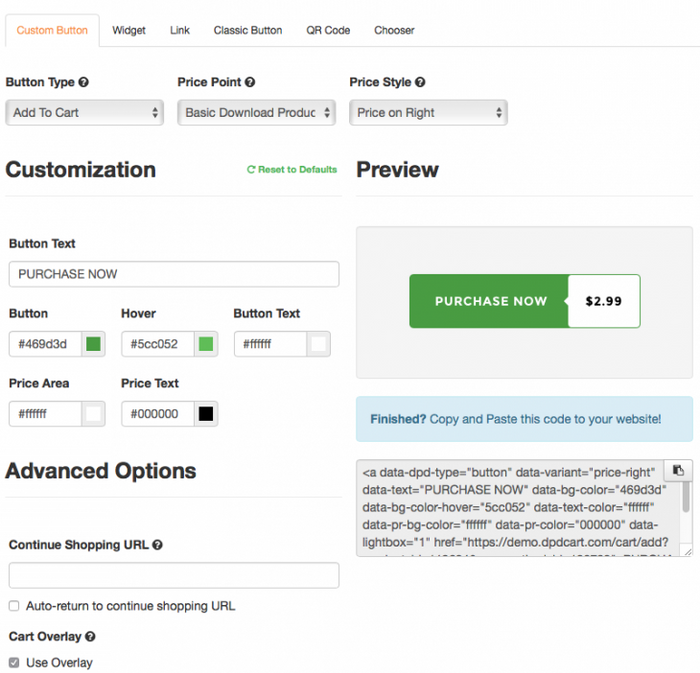
Both links open the new Link Code page for that product that include all the new options as well as a "Classic Button" option to generate the old style DPD image based buttons for existing sites and PayPal branded buttons.
Custom Button Generator
The new custom button generator gives you the ability to create buttons with customized colors, text, and price display to match your website. DPD will automatically remember your last color choices used for that store so the next time you return it will be pre-configured and ready to go.
Custom buttons can be shown with a price bubble attached in several orientations:PURCHASE NOWPURCHASE NOWOr no price at all:PURCHASE NOWColors and text can also be customized to your heart's content:BUY THIS THING!
When creating buttons you can specify if its an instant checkout product, add-to-cart button, link to the DPD hosted product page in your cart, or a view cart / checkout button.
You can also select if you want to use the overlay cart on your web page or make the buttons launch the cart in a new window or specify an override continue shopping URL as with the old buttons.
New Product Widgets:
DPD has added the ability to create 3 new product widgets- Landscape (horizontal), Portrait (vertical), and No Image.
Product widgets include the product description, price, what is included with the product, and optionally the product image. Description text is customizable, and like the buttons all colors and button text are customizable too.
Basic Download Product
Widgets look best with square images at least 400x400 in size. For information what size product images work best with all DPD features, please see our new KB article on Product Image Guidelines.
Old Style Image Buttons
We recognize that you may be currently using the old style image buttons on your website, so they're still available under the "Classic Button" tab of the new Link Code generator.
Also retained from the old generator is the ability to create product choosers / select boxes, plain link codes, and QR code images.
Other Updates in this Release
Updated chromeless lightbox for all carts
Fixed from/reply-to email headers for some emails that were going to spam
Mark imports for free checkouts as sending the correct email
Escape values in CSV/XLSX export
Implemented 3rd party integrations for redirect URLs
Updated translations for Upsell page.
Mark tracking html as sent on customer import
Fixed ActiveCampaign integration throwing warning if given a bad response
Better Subscribers Export (Added XLSX support, Added Status column to export, Export honors currently selected filters)
Updated weekly sales email to modern responsive template
Styled product/edit image upload area
Add Singapore to Stripe countries
Start Your 30-Day Free Trial Today.
No Commitments. Cancel Any Time.
Not ready to commit yet? We understand. Start a 30-day trial of our e-book publishing platform for FREE and explore how it can help you sell e-books, digital products, and downloadable content. No credit card required.
If you’re not happy with our online publishing platform, you can cancel at any time. No questions asked. That’s how confident we are with our product.