New DPD Developer Docs, With an API You Can Try in Your Browser
- Jason
- DPD Updates, Feature Spotlight
DPD's developer documentation has a new home at docs.getdpd.com. If you've ever wanted to customize how DPD looks on your site, or pull your sales into your own tools, this is where to start.
Our old API reference hadn't been touched in years, so we rebuilt it from scratch, checked every page against the code, and added docs for the new cart components while we were at it.
Try the API in Your Browser
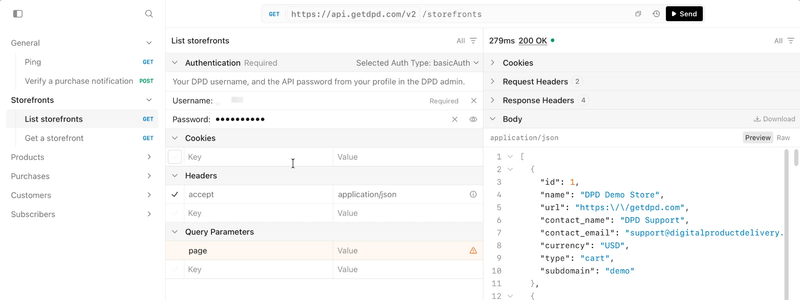
The API docs now have a console where you can send a real request to any endpoint with your own account and see the answer, before you write a line of code. That's the console up top, listing our demo store's storefronts.
Here's how to try it:
- Open docs.getdpd.com/api/try and pick an endpoint, like List storefronts.
- Click Test Request.
- Enter your DPD username, and the API password from your profile in the DPD dashboard (it's not the password you sign in with).
- Click Send.
Your request goes straight from your browser to api.getdpd.com. Your password isn't saved or sent anywhere else. Keep in mind that it's your real account: you'll see your real customers and orders, and Reactivate a purchase really does email the customer.
Docs for the Embed Components
Last week we launched embed components that put your products and cart right on your own website. The new docs have a page for each one, with every option and a live example you can click. The examples sell from our demo store in test mode, so go ahead and add things to the cart.
You'll also find:
- Styling: every CSS variable and
::part()name, with examples you can copy. - Where they work: how to add your domains, and what visitors see on a site that isn't allowed.
- Events: hooking the cart into your analytics or your own scripts.
Read the embed component docs →
Classic Buy Buttons
If you've had DPD buttons on your site for years, they're covered too. The buy button docs list every setting the button code page writes, the class names you can style, and how to switch a link over to the new cart drawer one at a time.
OpenAPI and llms.txt
The whole API is also described in an OpenAPI file. Import it into Postman or Insomnia and you get every endpoint ready to go, or hand it to a code generator to build a client in your language.
And if you build with an AI coding agent like Claude or Cursor, point it at docs.getdpd.com/llms.txt. It's the docs as plain text an agent can read in one go. Something like this works pretty well:
Read https://docs.getdpd.com/llms.txt, then add a product card for
DPD product 123 and a cart button to the header of my site.
The AI agents page has a few more prompts to start from.
Tell Us What's Missing
We'll keep adding to the docs as we go. Got something you'd like covered, or did you spot a mistake? Let us know. We'd love to hear what you build with it!
Start Your 30-Day Free Trial Today.
No Commitments. Cancel Any Time.
Not ready to commit yet? We understand. Start a 30-day trial of our e-book publishing platform for FREE and explore how it can help you sell e-books, digital products, and downloadable content. No credit card required.
If you’re not happy with our online publishing platform, you can cancel at any time. No questions asked. That’s how confident we are with our product.