New Zapier Triggers, Searches and Resend Purchase Email for DPD
- Jason
- DPD Updates, Feature Spotlight
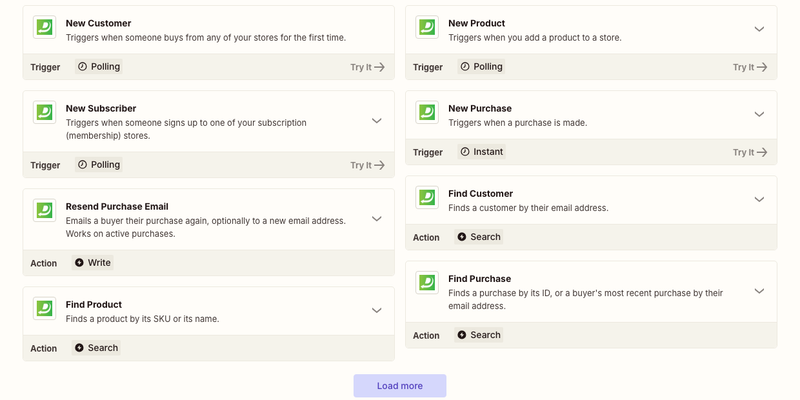
For years, DPD's Zapier app did one thing: start a Zap when someone bought from you. This week we shipped a big update to it.
It now has four triggers, four searches and an action that emails a buyer their purchase again.
New Triggers
A trigger starts a Zap. Alongside New Purchase, you can now start one with:
- New Customer: when someone buys from any of your stores for the first time. It's a good fit for adding people to your CRM, since repeat buyers don't come through twice.
- New Subscriber: when someone joins one of your subscription (membership) stores. You get their email, their plan's price and their next payment date.
- New Product: when you add a product to a store. Post it to your Slack, add it to a spreadsheet of your catalog, or let your newsletter tool know.
Searches
Searches find something in DPD partway through a Zap, so a later step can use it:
- Find Purchase: by its purchase ID, or a buyer's most recent purchase by their email address.
- Find Customer: by email address.
- Find Product: by SKU or by name.
- Find Subscriber: by email address, with the status of their subscription. Handy for checking whether someone is still an active member before you give them access to something else.
Resend Purchase Email
"I can't find my download link" is probably the email you answer most. Resend Purchase Email sends a buyer their purchase email again, with their download links. You can also give it a new email address, for the buyer who typed theirs wrong at checkout. DPD changes the address on the purchase and sends it there. The purchase ID field has a dropdown of your recent purchases, so you can also pick one by hand.
Put it together with Find Purchase and you can answer those emails without opening DPD at all. Here's one way to set it up with Gmail:
- Trigger: Gmail's New Email Matching Search, with a search like
subject:download. - Search: DPD's Find Purchase, with the sender's email address in Buyer's Email.
- Action: DPD's Resend Purchase Email, with the purchase ID from step 2.
If the sender hasn't bought anything, the Zap stops at step 2 and nothing is sent. (You might still want to reply to that one yourself.)
A Better New Purchase Trigger
New Purchase got a few upgrades too:
- It now includes each coupon the buyer used (its name, code and discount) and whether they opted in to your marketing emails. That last one helps if you send buyers to Mailchimp or Kit and only want the ones who said yes.
- When you test the trigger in Zapier, it shows your store's newest purchases instead of its oldest.
If you already have Zaps that use New Purchase, you don't need to change anything. Every field is still there, in the same format, and your Zaps keep running like before.
How to Get Started
- In Zapier, create a Zap and search for DPD.
- Pick a trigger, search or action.
- Connect your account with your DPD username and your API key. The key is on your profile in the DPD dashboard, under API credentials (it's not the password you sign in with).
We've also sent Zapier ten ready-made templates for the new pieces, like adding new customers to HubSpot and keeping a Google Sheet of new members. They'll show up on our Zapier page as Zapier approves them.
Tell Us What You'd Like Next
Is there a trigger or action you wish DPD had on Zapier? Let us know. And if you'd rather build your own integration, everything here uses the DPD API, which has brand new docs.
Start Your 30-Day Free Trial Today.
No Commitments. Cancel Any Time.
Not ready to commit yet? We understand. Start a 30-day trial of our e-book publishing platform for FREE and explore how it can help you sell e-books, digital products, and downloadable content. No credit card required.
If you’re not happy with our online publishing platform, you can cancel at any time. No questions asked. That’s how confident we are with our product.