See Where Every DPD Sale Came From in Google Analytics 4
- Jason
- DPD Updates, Feature Spotlight, Integrations
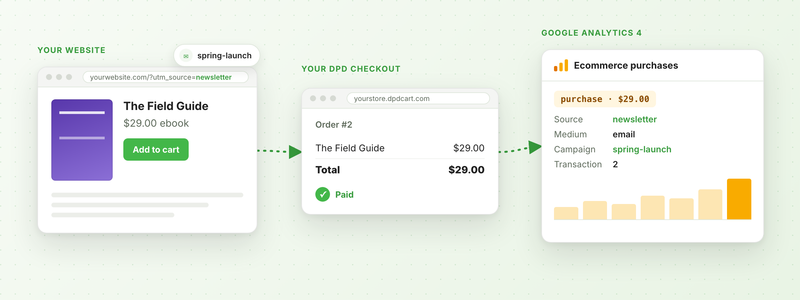
When someone clicks the link in your newsletter, buys your ebook and checks out with DPD, Google Analytics 4 should say the newsletter made that sale. Until this week it often didn't. The sale showed up as "(direct)", or as a referral from dpdcart.com or PayPal, and the campaign that brought the buyer in got no credit.
We've rebuilt DPD's Google Analytics 4 integration to fix that, and a few other things we found along the way. It's the biggest change to it since we moved every cart to GA4 in 2023.
Sales Credited to the Right Campaign
Your website and your DPD store live on different domains, so GA4 used to see two visitors: one on your site and a new one on your store. Now DPD's script (the one in your buttons, widgets and cart components) carries the visitor along each time a shopper heads to your store. GA4 sees one person, and the sale keeps their source, medium and campaign.
- It works through DPD's pop-up cart too, where browsers often block analytics cookies.
- It carries your
utm_tags and Google Ads click IDs (gclid), even when the shopper buys a few pages after they landed. - It works even if you haven't set up cross-domain measurement in GA4, as long as your website and your store use the same GA4 property. (We still recommend setting it up. The guide shows how.)
Cart Activity on Your Website
If you use our new cart components, DPD now sends your website's GA4 tag an event when a shopper adds a product (add_to_cart), removes one (remove_from_cart), opens the cart (view_cart) or heads to checkout (begin_checkout). Those fill in GA4's Checkout journey report, so you can see where shoppers drop off.
Sites using gtag.js get these with no extra work. If you use Google Tag Manager, DPD adds them to your data layer in GA4's ecommerce format, and you add a GA4 Event tag for each one.
Every Purchase Counted Once
While we were in there, we fixed a few bugs in the purchase event itself:
- Orders over $999 were sent with a comma in the total ("1,234.50"), which GA4 couldn't read. Amounts are plain numbers now.
- Stores with more than one GA4 integration had every sale counted once per integration in every property. Now each property gets its own copy of each sale, once.
- Reloading the thank-you page, or opening it later from the receipt email, sent the purchase again. Now it's only sent the first time.
- Each purchase now includes the coupon codes the buyer used.
The Buyer's GA4 Details on the Order Page
Every order now has a Google Analytics panel, under the map on the order page. It shows the buyer's GA4 client ID, their session in each of your GA4 properties, and the campaign they arrived with.
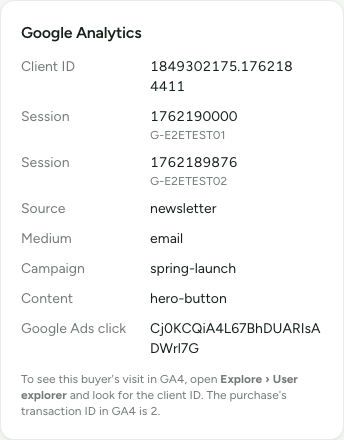
Copy the client ID, then open Explore › User explorer in GA4 and look it up. You'll see everything that buyer did, from the first page on your website to the purchase. Going the other way, a purchase's transaction ID in GA4 is its DPD order number.
Orders placed before this update, and orders you enter by hand, won't have these details. If your integration still has an old Universal Analytics ID (one that starts with UA-), the panel will tell you. Google stopped collecting data for those in 2023, so swap it for your GA4 Measurement ID (it starts with G-).
What You Need to Do
If your store already has the Google Analytics integration turned on with a G- Measurement ID, all of this is already working. There's nothing to update on your website either, since your DPD embed codes load the new script on their own.
Two settings in GA4 will make your reports a lot more accurate, though:
- Add your website's domain and your store's domain under Configure your domains.
- Add
paypal.comto your unwanted referrals, so PayPal doesn't take credit for sales.
Our Google Analytics guide walks through both, plus a quick test order to check it all works. New to GA4 with DPD? Go to Settings → Integrations in your dashboard, choose Google Analytics: gtag.js Tracking (GA4) and enter your Measurement ID.
Questions about your setup? Get in touch and we'll take a look.
Start Your 30-Day Free Trial Today.
No Commitments. Cancel Any Time.
Not ready to commit yet? We understand. Start a 30-day trial of our e-book publishing platform for FREE and explore how it can help you sell e-books, digital products, and downloadable content. No credit card required.
If you’re not happy with our online publishing platform, you can cancel at any time. No questions asked. That’s how confident we are with our product.