Tag

google analytics

See Where Every DPD Sale Came From in Google Analytics 4

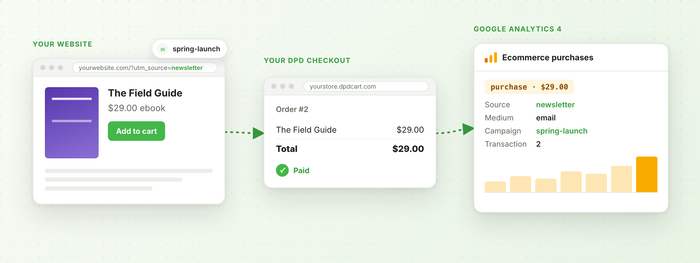
When someone clicks the link in your newsletter, buys your ebook and checks out with DPD, Google Analytics 4 should say the newsletter made that sale. Until this week it often didn't. The sale showed up as "(direct)", or as a referral from dpdcart.com or PayPal, and the campaign that brought the buyer in got no credit. We've rebuilt DPD's Google Analytics 4 integration to fix that, and a few other things we found along the way. It's the biggest change to it since we moved every cart to GA4 in 2023. Read the setup guide → Sales Credited to the Right Campaign Your website and your DPD store live on different domains, so GA4 used to see two visitors: one on your site and a new one on your store. Now DPD's script (the one in your buttons, widgets and cart components) carries the visitor along each time a...

Read more »

New Google Analytics: Universal Analytics Integration

Today we released a completely new Google Analytics: Universal Analytics integration for all-in-one tracking of your entire sales process and checkout flow with DPD. The new integration replaces the old Google Analytics eCommerce integration and manually placing code in the Tracking HTML field of your store preferences. The old Analytics Ecommerce integration should be disabled and all Analytics tracking code removed from the Tracking HTML field under store Preferences for accurate tracking results. The new Universal Analytics integration is available for all v2 stores in DPD under the Integrations menu. Note: Uses Universal Analytics This integration uses Universal Analytics using analytics.js, not the old "classic" analytics javascript. The new Universal Analytics updates faster, tracks better, and loads faster on your website. If you are using Classic analytics code on your website you must update your tracking code to use this new integration. New code is provided by the integration for...

Read more »

New Google Analytics Ecommerce Tracking Integration

Today we've released a new integration that automatically sends transaction information to Google Analytics Ecommerce Tracking.   The integration will pass the following on successful order completion with DPD: DPD purchase ID Order Total Tax and Shipping Totals Items included in the order This will let you track your sales, view traffic sources and referral info for purchases, generate reports, and more in Google Analytics. To set up the integration is easy.   Simply go to Integrations in the left menu, find the Google Analytics Ecommerce Tracking integration in the list, and click the +Add button.  Enter your Google Analytics account number for the website associated with your cart (found on your account home page after logging in to Analytics) and you're in business.  No complicated JavaScript or variables- DPD handles all that automatically. Other Improvements We've also made a change to the way the universal 3rd party tracking integration...

Read more »