This update contains a new feature, minor bug fixes, and several performance improvements designed to speed up the DPD admin, widget performance, and the DPD cart.
Redirect Products
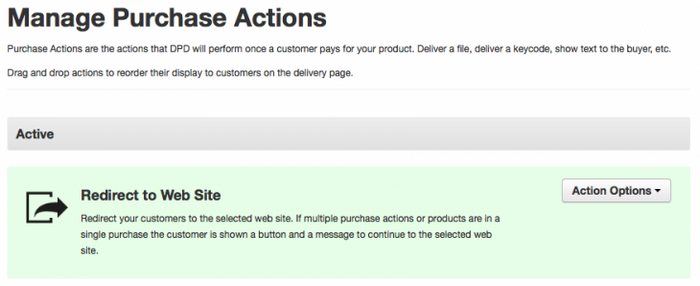
DPD now has a new "Redirect to Web Site" purchase action you can apply to digital products. This purchase action will automatically redirect the buyer to an external page of your choosing upon completed purchase. The DPD delivery page loads for a fraction of a second to allow 3rd party tracking scripts to run (like Google Analytics) and then redirects.
For an example of how this new purchase action works you can try the test item below:BUY REDIRECT PRODUCTUse test card number 4242 4242 4242 4242, any CVV, and any expiration date in the future to test.Because DPD checkouts can contain more than one product and each product can have more than one purchase action there are some conditions for the auto-redirect to work:
The redirect product must be the only product in the purchase. If there are other products we will not redirect the buyer away from our delivery page before they can get their downloads, keys, etc.
The product must not have any other purchase actions. If the product contains a file, key, message, etc. and a redirect we will not send customers away from the download page before they get their other purchase items.
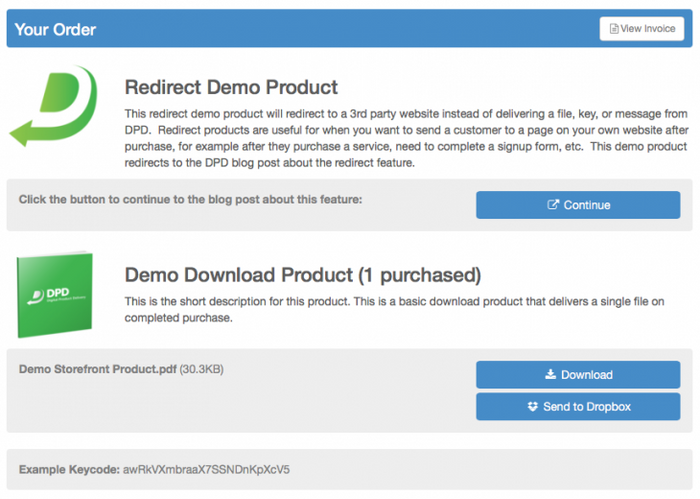
If we are unable to redirect due to the conditions above we will display a button to continue on the delivery page and your choice of message where you can tell the buyer to continue. You can configure the message when setting up the redirect purchase action.
This is an example purchase with multiple products with a redirect, showing the link message and button:
Because of the conditions required to automatically redirect, we recommend using instant checkout buy now buttons with redirect products if you want to ensure that they always automatically redirect to your web site.
Coupon Status Labels
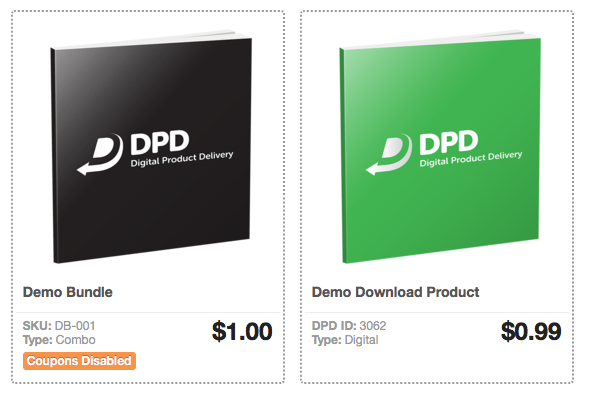
One of the most common support requests we receive is "Why won't my coupon work with this product?" In 99% of the cases this is caused by the product in question being marked as coupon ineligible on the product edit page. To make this more apparent, we've added a label to products that aren't marked as coupon eligible to the product lists in the DPD admin.
To mark a product as coupon eligible edit the product and check the "Coupon Eligible?" checkbox on the edit page, then save.
For more information: Cart shows "This coupon does not apply to any product in the cart" when trying to use a coupon
Other performance improvements and bug fixes in this update:
Added translations for v3 cart error messages
Fixed an issue with product choosers when using add-to-cart actions
Improved performance on widget and custom button rendering
Fixed an issue where widgets would partially render using Safari browsers
Fixed oversized close button on v2 carts
Fixed an issue where the lightbox cart would cause page jumpyness due to scroll bar rendering
Started recording shipping information in PayPal for PayPal Pro checkouts
Fixed a case where v3 carts were not storing billing name correctly
Fixed a bunch of typos in emails
Optimized internal "can be purchased" calls in DPD for better performance
Query optimization for sales stats
Updated shipping library to address a FedEx rate quote issue
Fixed MailChimp integration not supporting non-ascii chars in group names
Updated our field validators for better performance
Start Your 30-Day Free Trial Today.
No Commitments. Cancel Any Time.
Not ready to commit yet? We understand. Start a 30-day trial of our e-book publishing platform for FREE and explore how it can help you sell e-books, digital products, and downloadable content. No credit card required.
If you’re not happy with our online publishing platform, you can cancel at any time. No questions asked. That’s how confident we are with our product.