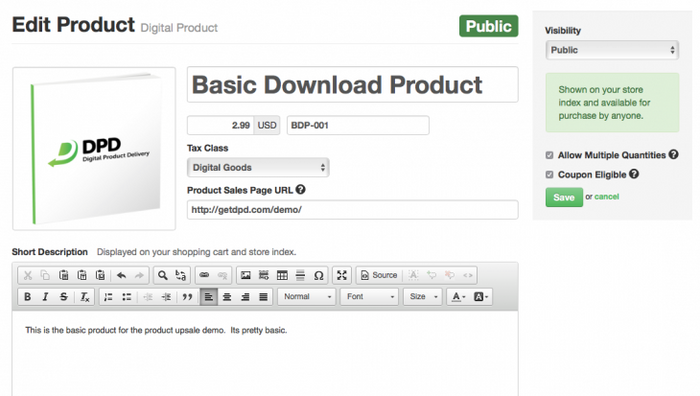
We've just released a completely redesigned product edit page that greatly reduces the length of the form and adds modern features like drag-and-drop image uploading.
Some highlights of the new product edit form:
Drag-and-Drop image upload. Simply drag your image to the image area, or click to open a standard file dialog to select your image.
The form now puts the most crucial fields required to configure the product at the top of the page.
Optional features are now collapsed at the bottom of the form, including the EULA feature and Upsell feature. One click expands these options for editing and they're automatically expanded if previously configured for the product.
There is a new sidebar product status / save box that is always with you on the page- no more scrolling to find the save button
New Product Visibility Setting
The new product visibility option replaces "show on cart index":
Public - shown on cart index, default state for new products
Hidden - must have the buy or add-to-cart URL to purchase, not shown on cart index
Disabled - new status which lets you temporarily disable a product without deleting it
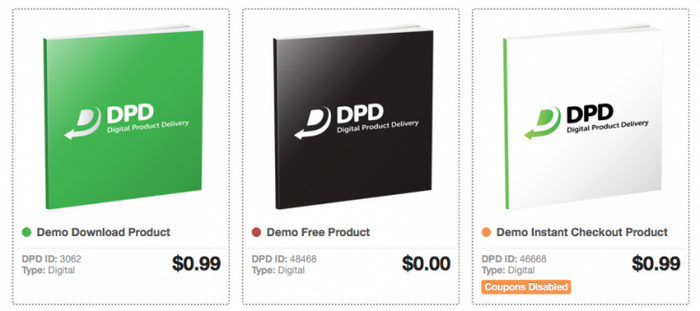
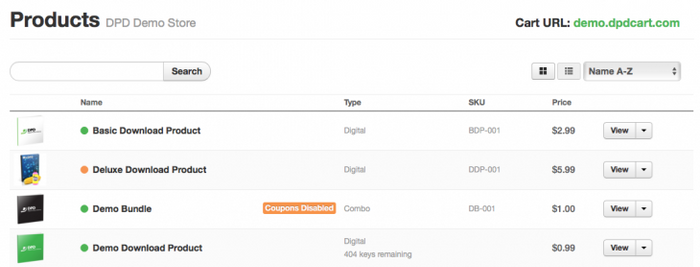
In addition to the "coupons disabled" label we released in the last update, we've added new product status indicators throughout DPD so you can tell at a glance what visibility state your product is in by looking at the colored "dot" beside the name.
The indicators are simple- Green for public, Orange for hidden, Red for disabled.
Other changes in this Update:
paypal ship-to state support
updated romania vat rate
removed support for gif images
Start Your 30-Day Free Trial Today.
No Commitments. Cancel Any Time.
Not ready to commit yet? We understand. Start a 30-day trial of our e-book publishing platform for FREE and explore how it can help you sell e-books, digital products, and downloadable content. No credit card required.
If you’re not happy with our online publishing platform, you can cancel at any time. No questions asked. That’s how confident we are with our product.